How to send your Kardia EKG to your doctor
In the Kardia app, tap History, then View EKG History. Tap the three dots next to a recording, then Download PDF. Share the PDF by email, your patient portal, or print it.
From Dr. Kenny Civello, cardiologist and electrophysiologist
Send the recordings that match how you felt. Add a note in the app about what you were doing and feeling. It prints on the PDF.
Send one EKG
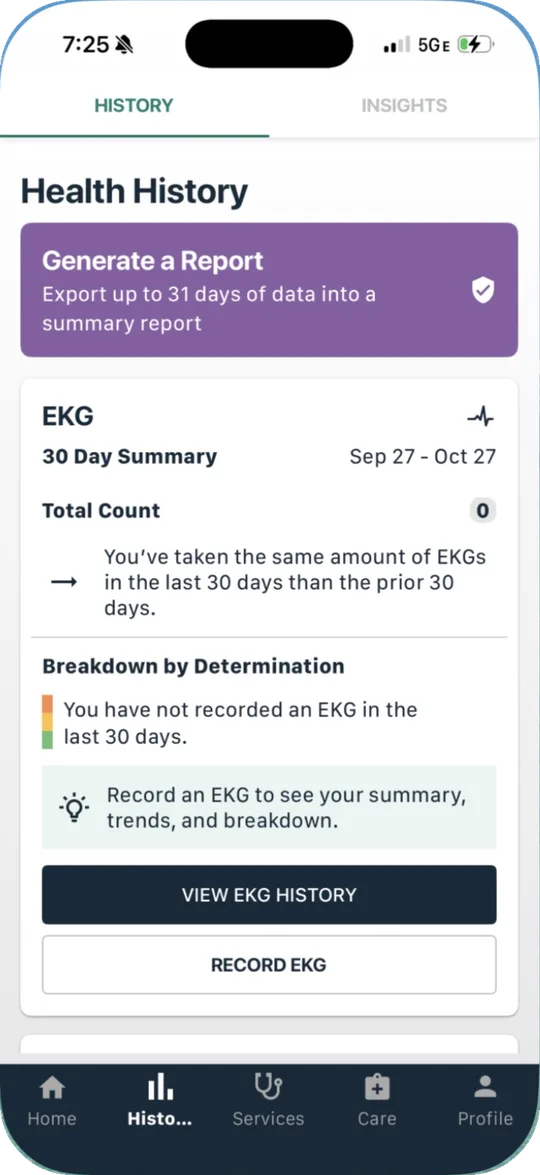
Open your EKG history
In the Kardia app, tap History at the bottom, then View EKG History.
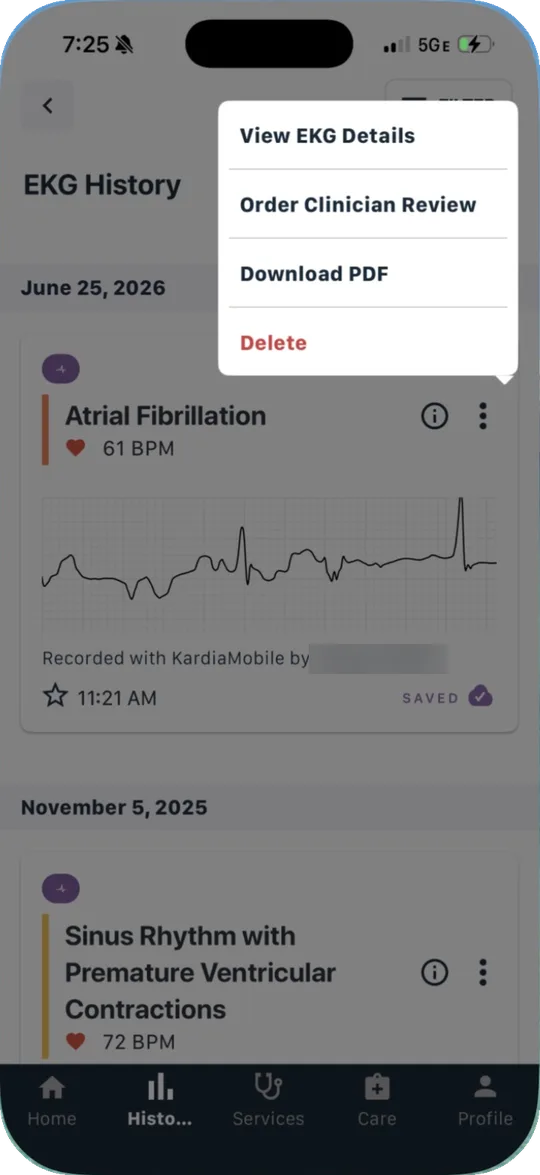
Pick the recording
Find the strip you want to send, usually the one you took while you had symptoms. Tap the three dots next to it, then Download PDF.
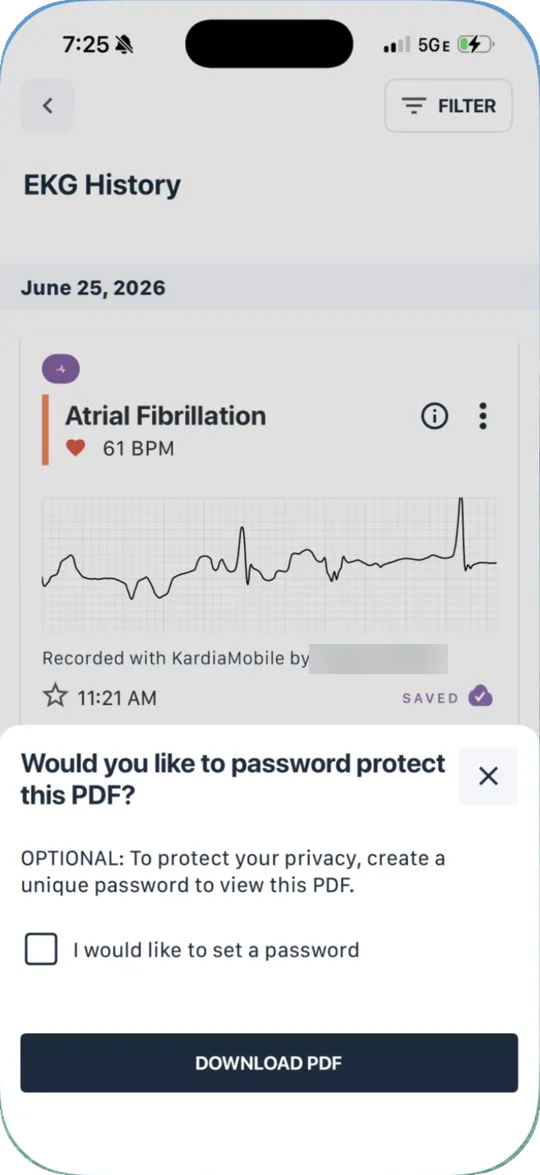
Choose a password, or skip it
Kardia asks if you want to password protect the PDF. It is optional. If you add one, tell the office the password by phone, not in the same email. Then tap Download PDF.
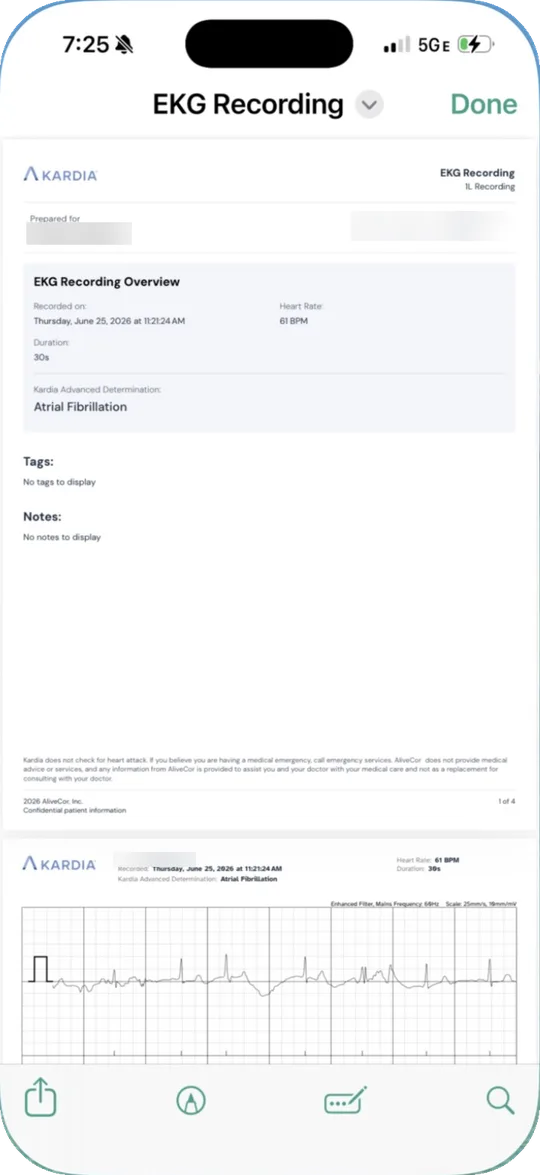
Check the PDF
It shows the date and time, your heart rate, the Kardia result, and the full tracing. Any note you added prints on it too.
Share it
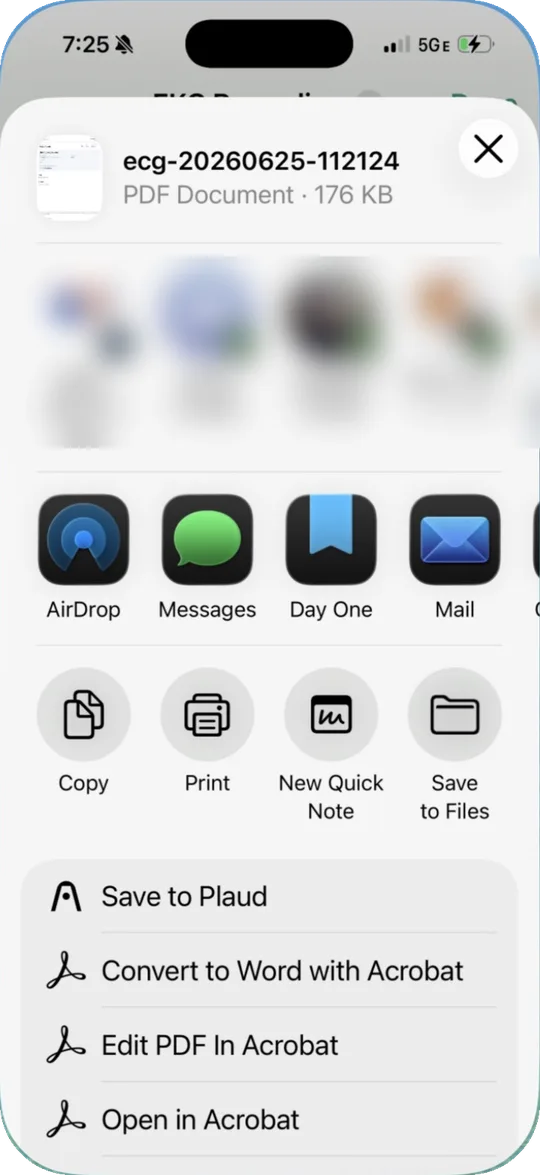
Tap the share button in the bottom corner. Choose Mail to email it, Save to Files to upload it to your patient portal, or Print to bring a paper copy.
Send a 31 day report
Make a summary report
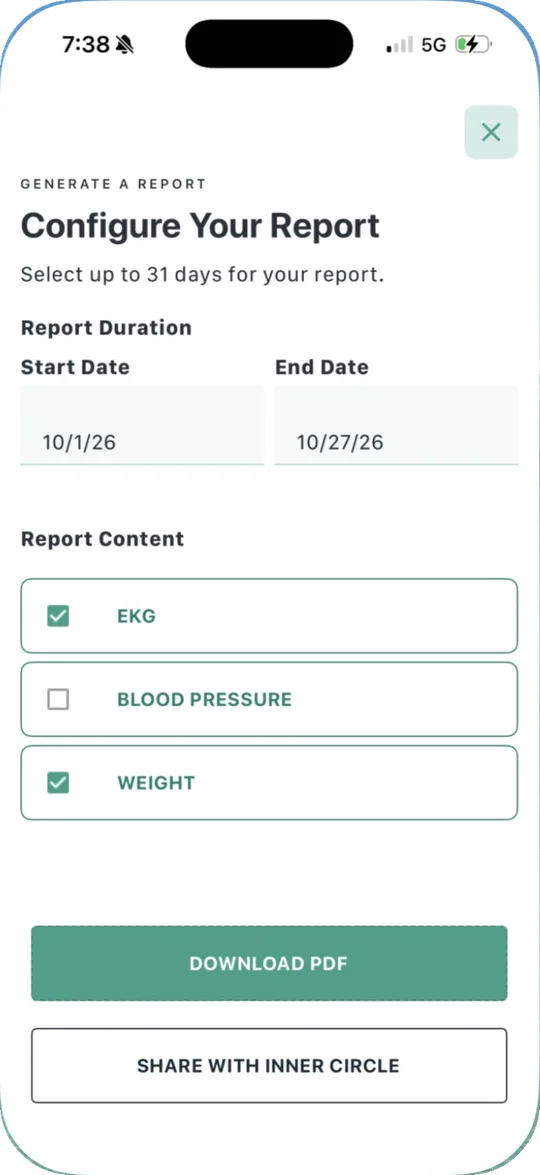
On the History tab, tap Generate a Report. Pick a start and end date, up to 31 days. Choose EKG, and blood pressure or weight if you track them. Tap Download PDF, then share it the same way.
What helps your doctor
Record during symptoms
Take a 30 second recording while you feel it. Sit still with your arms resting.
Add a note
Write what you felt and what you were doing. It shows up on the PDF.
Send it the way the office prefers
Many offices want it through the patient portal. My patients can call the office at 225 767 3900 to ask.
Bring it to your visit
Save the PDF to Files so you can show it even without a signal.
Call 911 for fainting, chest pain, shortness of breath, or any symptom that worries you.
Common questions
Does my doctor see my Kardia EKGs automatically?
Usually not. Unless your doctor’s office has set up a connection with Kardia, the recordings stay on your phone until you send them.
What is Order Clinician Review?
A separate Kardia service where a clinician working with Kardia reads your strip. It does not send the strip to your own doctor. Check the price in the app before you order it.
Should I send every recording?
No. Send the ones taken during symptoms, any that say Atrial Fibrillation, and any unclassified strips taken while you felt something. For a stretch of recordings, a 31 day report is easier to read.
I have an Android phone. Is it different?
The Kardia steps are the same. The share screen looks different, but it has the same choices, such as email and saving to your files.
I use an Apple Watch instead.
In the Health app, tap Browse, then Heart, then Electrocardiograms. Tap a recording, then Export PDF. See Set up your Apple Watch to check for AFib.
My strip says Unclassified. Should I still send it?
Yes, if you had symptoms when you took it. A doctor can usually read it. See My watch ECG says inconclusive.
More on wearables
Set up your Apple Watch to check for AFibSet up your Fitbit or Pixel Watch to check for AFibMy watch says I have AFibMy watch ECG says inconclusiveIrregular rhythm notifications, explainedMy watch says my heart rate is high or lowMy watch says I may have sleep apneaMy watch says I may have high blood pressureFDA cleared or wellness: what the label meansWhich wearable features are FDA clearedHow I choose the wearables I recommendFind the right wearableBest smartwatch for catching AFibBest smart ring for sleep trackingBest home blood pressure monitorBest personal ECG without a smartwatchBest wearable for an older parentWhat wearable to get your parent for the holidaysBest wearable for athletesBest wearable without a screenMore on atrial fibrillation
Lowering your AFib riskHow AFib is treatedGetting ready for your ablationThis page is general education for my patients. It does not replace advice from your own doctor. A Kardia result is not a diagnosis. Kardia and KardiaMobile are trademarks of AliveCor. This page is not affiliated with AliveCor. Steps checked on the Kardia app on an iPhone in October 2026. Screenshots are from the author’s own iPhone, with personal details blurred.
Based on: Joglar JA, et al. 2023 ACC/AHA/ACCP/HRS Guideline for the Diagnosis and Management of Atrial Fibrillation. Circulation. 2024.