Set up your Fitbit or Pixel Watch to check for AFib
Fitbit trackers and Google Pixel Watch can watch for signs of AFib, but only after you turn the features on in the Google Health app. Here is what your device can do, how to set it up, and what keeps it working.
From Dr. Kenny Civello, cardiologist and electrophysiologist
The Fitbit app became the Google Health app in May 2026. It holds three heart features. Most Fitbit and Pixel Watch models have irregular rhythm alerts. Only some can record an ECG. Pick your device below to see what yours has.
| Device | Irregular rhythm alerts | ECG | Heart rate alerts |
|---|---|---|---|
| Fitbit Air | Yes | No | Yes |
| Pixel Watch 2, 3, 4, 5 | Yes | Yes | Yes |
| Pixel Watch (first model) | No | Yes | Yes |
| Fitbit Sense, Sense 2 | Yes | Yes | Yes |
| Fitbit Charge 5, Charge 6 | Yes | Yes | Yes |
| Fitbit Inspire 3, Versa 3, Versa 4 | Yes | No | Yes |
| Older Fitbit Charge, Inspire, Luxe, Versa | Yes | No | Check your app |
Who these features are for
Irregular rhythm alerts and the ECG app are for adults 22 and older. Irregular rhythm alerts are not meant for people already diagnosed with AFib. Some features are offered only in certain countries. Your device may also need a software update first.
Your setup
Answer two questions, then work through the list in the Google Health app. Check off each step as you go.
Has a doctor told you that you have AFib?
See it on screen
These screens are from the Google Health app on an iPhone, paired with a Fitbit Air. Android looks much the same.
Find the heart features
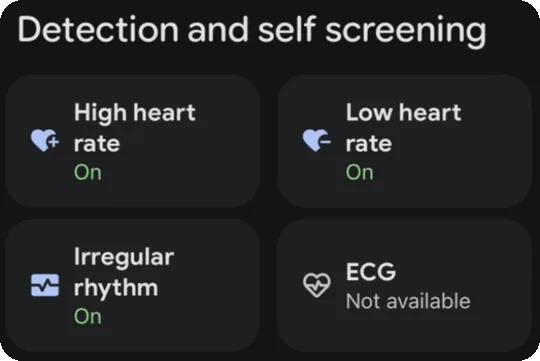
In the Google Health app, tap the Health tab and scroll to Detection and self screening. Each tile says On, Off, or Not available for your device.
Turn on irregular rhythm alerts
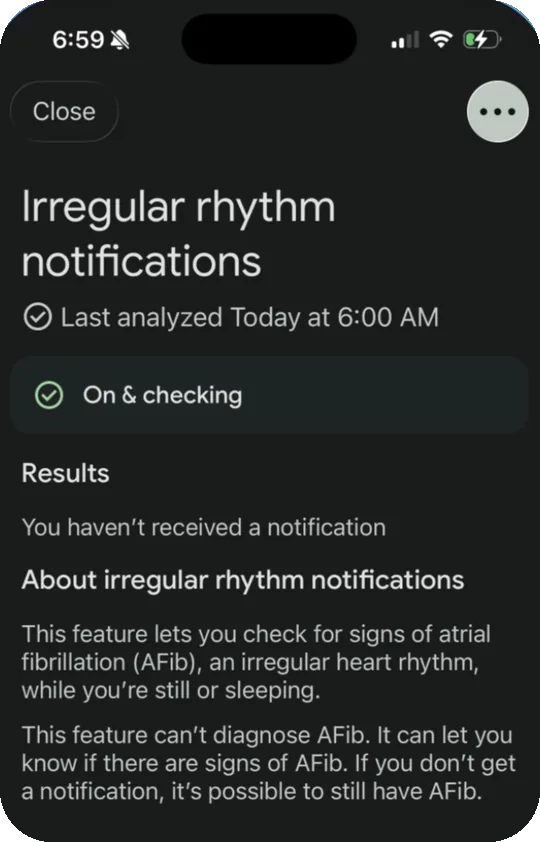
Tap Irregular rhythm, then Set Up, and follow the screens. When it is working, it says On and checking, along with when it last looked at your data.
Know where the settings are
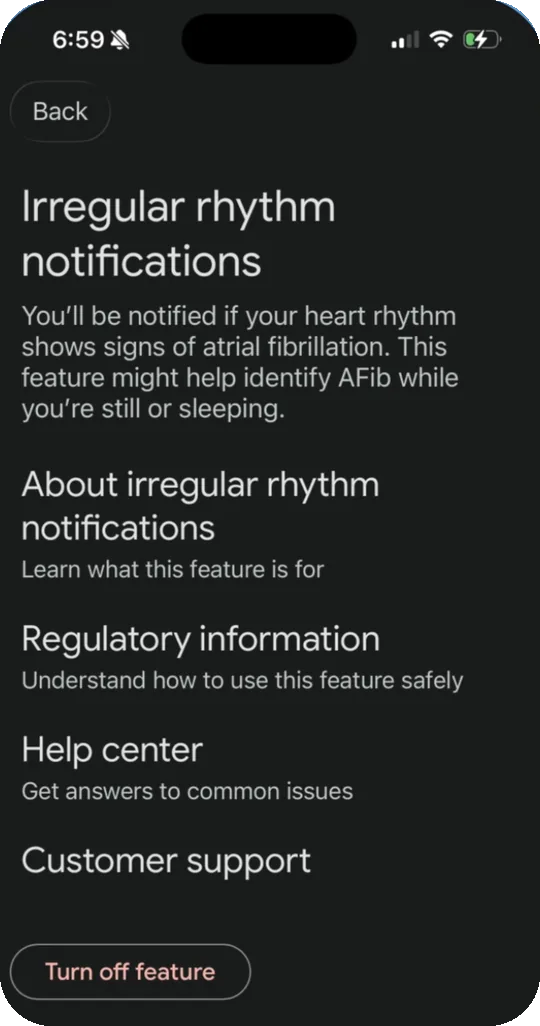
On the Irregular rhythm screen, tap the three dots, then Settings. This is where you find the FDA regulatory information, and where you would turn the feature off.
Set high and low heart rate alerts
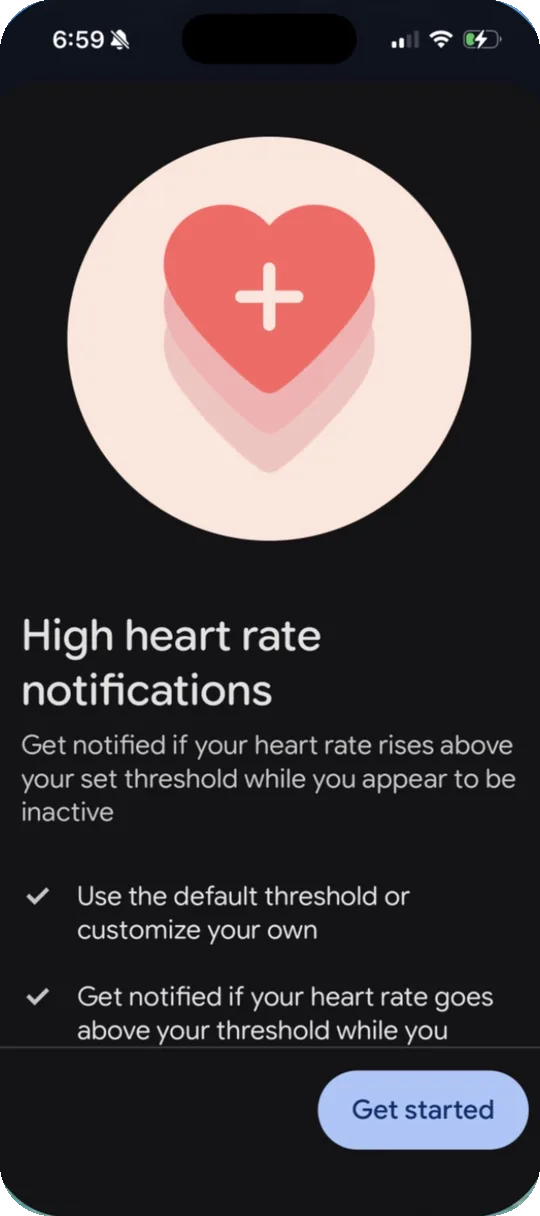
Tap High heart rate or Low heart rate on the Health tab, or go to Connections, your device, then Google Health reminders and alerts. You can keep the default limit or set your own.
What quietly stops it
If you stop seeing heart data, check these first.
Not syncing
Your device checks in the background, but the app only looks for AFib when your device syncs. Open the Google Health app often, and keep Bluetooth on.
Heart rate tracking is off
It is on by default. If it was turned off, turn it back on in your device's settings under Heart Rate.
Phone notifications are off
Fitbit Air has no screen, so alerts come to your phone. On iPhone, open Settings, then Notifications, then Google Health, and allow notifications.
A loose band
Wear it on top of your wrist, a finger's width above the wrist bone, snug enough that it does not slide.
Battery saver on Pixel Watch
Battery saver limits background activity and can delay notifications. Keep your watch charged.
A device that is not supported
If you switch to a model without irregular rhythm alerts, its data is not checked. The table above shows which ones have it.
Record and share an ECG
For Pixel Watch, Fitbit Sense, Sense 2, Charge 5, and Charge 6. Record one when you get an alert, and any time you feel your heart racing or skipping.
Install the ECG app
On a Fitbit, open the Google Health app, tap Connections, your device, Apps, ECG, then Install. On a Pixel Watch, open the Play Store on the watch, find the ECG app, and install it. Then, in the Health tab, tap ECG, then Get started.
Sit and rest your arms
Rest your forearms on a table or your lap and stay still.
Hold the sensor for 30 seconds
On Pixel Watch, open the ECG app and hold a fingertip on the crown. On a Fitbit, hold your fingers on the metal contact points of the device. Keep holding until the countdown ends.
Make a PDF for us
In the Health tab, tap ECG, tap the reading, then Export PDF for your provider, then Download PDF. Bring it to your visit.
What the results mean
The app says Normal sinus rhythm, Atrial fibrillation, or Inconclusive. Inconclusive can mean your heart rate was over 120 or under 50, or the signal was poor. Save every reading. See My watch ECG says inconclusive.
If you have fainting, chest pain, shortness of breath, or any other symptom that worries you, call 911. Do not wait for your device.
Common questions
My Fitbit Air has no screen. How will I know?
Alerts come through the Google Health app on your phone. Keep notifications on for the app, and sync often.
Irregular rhythm says On. Why have I never gotten an alert?
Usually because it has not seen signs of AFib. But it only checks while you are still or asleep, and it can miss AFib. If you feel symptoms, record an ECG if your device can, and tell us.
I have AFib. What should I turn on?
Irregular rhythm alerts are not meant for you. The ECG app is the most useful tool, if your device has it, along with heart rate alerts. Google does not have a weekly AFib estimate like Apple's AFib History.
Is this FDA cleared?
Yes. Fitbit irregular rhythm notifications and the Fitbit ECG app are both FDA cleared. You can see the records on Which wearable features are FDA cleared, and in the app under Regulatory information.
I got an alert. What now?
Record an ECG if your device can, save it, and tell us. My watch says I have AFib walks through the next steps.
I use an Apple Watch instead.
More on wearables
Set up your Apple Watch to check for AFibMy watch says I have AFibMy watch ECG says inconclusiveIrregular rhythm notifications, explainedMy watch says my heart rate is high or lowMy watch says I may have sleep apneaMy watch says I may have high blood pressureFDA cleared or wellness: what the label meansWhich wearable features are FDA clearedHow I choose the wearables I recommendFind the right wearableBest smartwatch for catching AFibBest smart ring for sleepBest home blood pressure monitorBest personal ECG without a smartwatchBest wearable for an older parentBest wearable for athletesBest wearable without a screenMore on atrial fibrillation
Lowering your AFib riskHow AFib is treatedGetting ready for your ablationThis page is general education for my patients. It does not replace advice from your own doctor. Watch alerts and ECG apps are not a diagnosis. Fitbit, Pixel Watch, and Google Health are trademarks of Google LLC. This page is not affiliated with Google. Steps checked against Google Health Help and the app on an iPhone in October 2026.
Based on: Joglar JA, et al. 2023 ACC/AHA/ACCP/HRS Guideline for the Diagnosis and Management of Atrial Fibrillation. Circulation. 2024. FDA 510(k) K212372, Fitbit Irregular Rhythm Notifications, and K200948, Fitbit ECG App. Google Health Help: irregular rhythm notifications, ECG app, and heart rate notifications.